
Building a Wedding Website

Having a wedding website was a must for us.  Most of our guests are in our age group and rather “fluent” with technology.  We want to keep our paper invitations simple and classy, so we decided to personalize our website with details about us and our wedding.

There are many websites offering an easy DIY format where you insert your wedding information for about $100.  We elected to build ours on the iWeb Mac program, which allows us to personalize the website with additional details/tools than the standard format offers, but also costs about $100/annually to host.

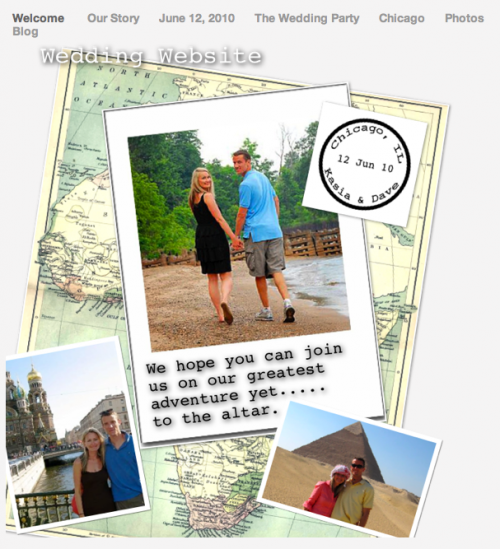
Here is a snapshot of our “Welcome” page with our wedding logo (the passport stamp), a map of Africa in the background (the continent that brought us together), and some photos of our travels.
picture-41

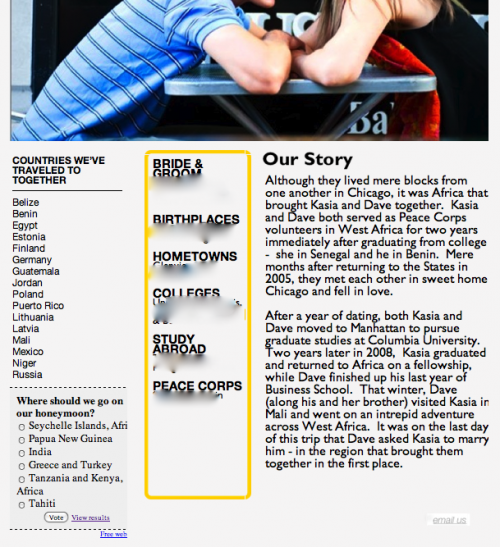
Here is a snapshot of “Our Story” page.  (I cut off the top of our picture b/c the screen was too long). We are avid travelers so we included a list of countries we have visited together and added a poll that allows guests to vote for our honeymoon destination.  We added our story and some background info  so our family’s guests got a better idea of who we are.
picture-22

The next page “June 12, 2010″ outlines the details of our day such as the Ceremony, Reception, Hotels, Registry, and map, and has a countdown timer at the top right-hand corner.

picture-101

The “Wedding Party” page showcases our gorgeous friends and their relationships to us.

The “Photos” are home to 3 albums: Us, Family, and Friends.

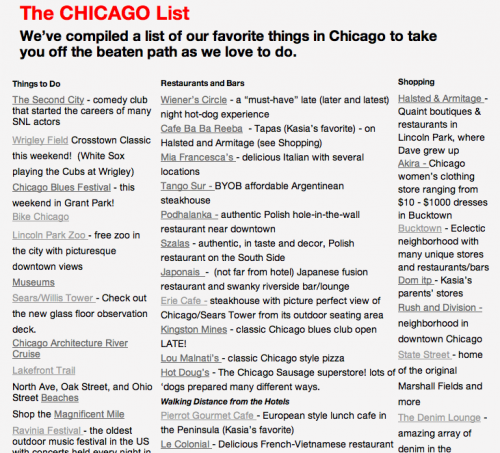
And last but not least, the “Chicago” page lists our favorite places to go and visit in the city, hyperlinked, for all of our out-of-town guests (over 60%)!
picture-52

This website has is a constant work in progress but the more I spend time procrastinating with it, the more personal it feels.

What website builders do you recommend?  What special items did you include on your website?

we heart your comments!
  1. I love the interactive elements to the website, like the poll, and the detail in the Chicago page. I am sure your guests will LOVE the website. Looks like a lot of thought was put into it!

  2. Wow, your website looks fabulous! It gives me inspiration to work a little more on mine….

  3. I have this same program and have been playing around with it to create a wedding website but yours looks soooo much better than what I’ve been creating. How did you learn how to do all the extra stuff??

  4. Great job, well done! Wish you all the best in your wedding website.

  5. Many of the extras I added by inserting “HTML snippets.” Just google the things you’d like on your website plus HTML code… FOr example, google “poll HTML code MAC” or “countdown clock HTML code Mac” etc…. Then copy the HTML code and insert it on any page by clicking INSERT, HTML SNIPPET>

  6. Felicity writes... {February 17, 2010 at 8:24 am}

    This looks great, super stylist and chock full of information!

  7. Wow- this looks great! I love the interactive parts and “your Chicago List.” With so many out-of-town guests, they will definitley feel taken care of!

  8. Felicity writes... {February 23, 2010 at 9:03 pm}

    By the way, Puerto Rico is not a “country”.

  9. Hi! I am a NC bride-t0-be and I also made my own website. I just couldn’t settle with one of those pre-made, non-customizable sites from a place like The Knot! I made ours with WordPress and I am hosting it along with my other sites, so in reality I only spent $20 for our domain name for two years. You can see my site at http://www.laketoxawaywedding.com

    Can we see a live version of your site or did you password protect it? I love getting inspiration from other wedding sites so I’d love to see yours in action!

    Cheers,
    Tracy
    .-= Tracy Boyer’s most recent blog post: LT homeowners: please donate extra rooms to out-of-town guests! =-.

Leave a Comment